This section designs a personal information input interface: input name, gender, age, native place, and hobbies, then output to a specified location.
Example in Excel VBA
Add a UserForm in Excel VBA, add controls, and design the interface (sample file: Samples\ch14\Excel VBA\Example.xlsm), as shown in Figure 2-14.
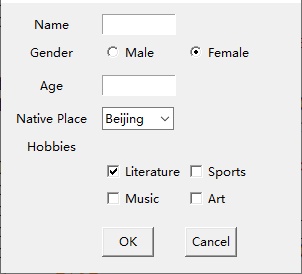
Figure 2-14 Designed interface
Initialize the native place combo box in the UserForm_Activate event:
Private Sub UserForm_Activate()
    With cmbNative
        .AddItem "Beijing"
        .AddItem "Tianjin"
        .AddItem "Shanghai"
        .AddItem "Chongqing"
        .AddItem "Guangdong"
        .AddItem "Jiangsu"
        .ListIndex = 0
    End With
End Sub
Output data to the Immediate Window when clicking OK (cmdOK_Click):
Private Sub cmdOK_Click()
    Dim strData As String, strHobby As String
    ' Name
    If txtName.Text <> "" Then
        strData = txtName.Text
    Else
        strData = "-"
    End If
    ' Gender
    If optBoy.Value Then
        strData = strData & ",Male"
    ElseIf optGirl.Value Then
        strData = strData & ",Female"
    End If
    ' Age
    If txtAge.Text <> "" Then
        strData = strData & "," & txtAge.Text & " years old"
    Else
        strData = strData & ",- years old"
    End If
    strData = strData & ",Native Place: " & cmbNative.Text
    ' Hobbies
    strHobby = ""
    If chkPaper.Value Then strHobby = strHobby & "Literature "
    If chkPhis.Value Then strHobby = strHobby & "Sports "
    If chkMusic.Value Then strHobby = strHobby & "Music "
    If chkArt.Value Then strHobby = strHobby & "Art"
    strData = strData & ",Hobbies: " & strHobby
    ' Output to Immediate Window
    Debug.Print strData
End Sub
Exit when clicking Cancel (cmdCancel_Click):
Private Sub cmdCancel_Click()
    Unload Me
End Sub
Figure 2-15 Running interface
Output example: Zhang San,Male,25 years old,Native Place Beijing,Hobbies Literature Music
Example in Python Tkinter
Create the interface with Tkinter (sample file: Samples\ch14\Python\Sample.py):
from tkinter import *
from tkinter import ttk
# Create form
form = Tk()
form.geometry('300x270+100+100')
# Variables
g1 = IntVar()  # Gender
g1.set(0)
c1 = DoubleVar(value=True)  # Hobbies
c2 = DoubleVar()
c3 = DoubleVar()
c4 = DoubleVar()
# Name
label_name = Label(form, text='Name')
label_name.grid(row=0, column=0, padx=30, pady=(10, 0))
entry_name = Entry(form, width=10)
entry_name.grid(row=0, column=1, sticky=W, pady=(10, 0))
# Gender
label_sex = Label(form, text='Gender')
label_sex.grid(row=1, column=0, pady=5)
option_sex1 = Radiobutton(form, text='Male', variable=g1, value=1)
option_sex1.grid(row=1, column=1, sticky=W)
option_sex2 = Radiobutton(form, text='Female', variable=g1, value=0)
option_sex2.grid(row=1, column=2, sticky=W)
# Age
label_age = Label(form, text='Age')
label_age.grid(row=2, column=0, pady=5)
entry_age = Entry(form, width=10)
entry_age.grid(row=2, column=1, sticky=W)
# Native Place
label_native = Label(form, text='Native Place')
label_native.grid(row=3, column=0, pady=5)
combo_native = ttk.Combobox(form, width=7)
combo_native.grid(row=3, column=1, sticky=W)
combo_native['value'] = ('Beijing', 'Shanghai', 'Guangdong', 'Jiangsu', 'Tianjin', 'Chongqing')
combo_native.current(0)
# Hobbies
label_hobby = Label(form, text='Hobbies')
label_hobby.grid(row=4, column=0)
check_hobby1 = Checkbutton(form, text='Literature', variable=c1)
check_hobby1.grid(row=5, column=1, sticky=W)
check_hobby2 = Checkbutton(form, text='Sports', variable=c2)
check_hobby2.grid(row=5, column=2, sticky=W)
check_hobby3 = Checkbutton(form, text='Music', variable=c3)
check_hobby3.grid(row=6, column=1, sticky=W)
check_hobby4 = Checkbutton(form, text='Art', variable=c4)
check_hobby4.grid(row=6, column=2, sticky=W)
# Buttons
button_yes = Button(form, text='OK', width=6, command=get_data)
button_yes.grid(row=7, column=1, sticky=W, pady=15)
button_cancel = Button(form, text='Cancel', width=6)
button_cancel.grid(row=7, column=2, sticky=W)
form.mainloop()
Add the get_data() function for the OK button:
python
def get_data():
    data = []
    # Name
    if len(entry_name.get()) > 0:
        data.append(entry_name.get())
    else:
        data.append('-')
    # Gender
    data.append('Male' if option_sex1['value'] == 1 else 'Female')
    # Age
    if len(entry_age.get()) > 0:
        data.append(int(entry_age.get()))
    else:
        data.append('-')
    # Native Place
    data.append(combo_native['value'][combo_native.current()])
    # Hobbies
    mystr = ''
    if c1.get():
        mystr += check_hobby1['text'] + ' '
    if c2.get():
        mystr += check_hobby2['text'] + ' '
    if c3.get():
        mystr += check_hobby3['text'] + ' '
    if c4.get():
        mystr += check_hobby4['text']
    data.append(mystr)
    print(data)
Figure 2-16 Interface created with Python Tkinter
Output example: ['Zhang San', 'Male', 25, 'Tianjin', 'Literature Music ']